Some links on this page are affiliate links. If you sign up through one, TradeStackLab earns a commission at no extra cost to you. We only recommend tools we’d actually use on a job, and a commission never buys a better review.
Best Roofing Software 2026: What Actually Helps on the Job
Roofing is messy work to manage. You’re dealing with weather delays, subcontractors, material orders, insurance jobs, and customers who want constant updates. Most generic service software doesn’t account for any of that. The tools on this list do — at least more than most.
We looked at what roofing contractors actually use day-to-day: estimating, job scheduling, crew communication, invoicing, and photo documentation. Not every tool does all of these well. We’ll tell you where each one falls short.
Quick Comparison: Top Roofing Software Picks
| Software | Best For | Estimating | Scheduling | Insurance Jobs | Pricing Tier |
|---|---|---|---|---|---|
| ServiceTitan | Larger roofing companies | Strong | Strong | Yes | High |
| JobNimbus | Roofing-focused workflows | Strong | Moderate | Yes | Mid |
| AccuLynx | Insurance restoration contractors | Strong | Moderate | Yes (deep) | Mid |
| Jobber | Small roofing crews | Basic | Strong | No | Low–Mid |
| Contractor Foreman | Budget-conscious contractors | Moderate | Moderate | No | Low |
Recommended Gear
Ready to see if Jobber fits your business?
Try Jobber →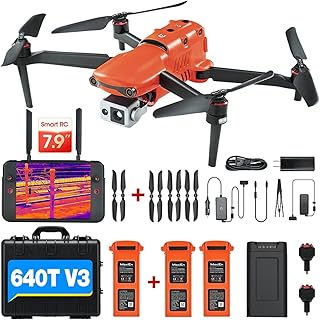
Affiliate Link
Autel Robotics EVO II Dual 640T V3, 640×512 Thermal Imaging Drone, Remote ID…
4.1★ (54 reviews)
For roofing companies doing insurance restoration work, a thermal drone like this pairs directly with the aerial measurement integrations JobNimbus and AccuLynx support — though at $4,099, it’s a tool for volume restoration contractors, not occasional claims.
Our Top Picks — Reviewed Honestly
1. ServiceTitan — Best for Established Roofing Companies
ServiceTitan is enterprise-grade software. It was built for HVAC and plumbing first, but it has expanded into roofing and it shows — in both good and bad ways.
On the good side: the scheduling, dispatching, and invoicing tools are mature and polished. If you’re running a crew of ten or more and doing both residential and commercial work, the depth of reporting alone is worth considering. You can track job costs, technician performance, and revenue by job type. That kind of visibility is hard to find in roofing-specific tools.
On the bad side: the price is high. It’s aimed at companies that can justify a significant monthly investment. There’s also a learning curve — onboarding takes time, and you’ll likely need their implementation support to get set up properly. A two-man roofing crew doesn’t need this tool.
- Strong job costing and reporting
- Solid customer communication tools
- Works well if you’re also doing HVAC or other trades
- Expensive and overkill for smaller operations
- Not built specifically for roofing workflows out of the box
If you’re running a growing roofing company and need serious business management tools, ServiceTitan is worth a look. ServiceTitan
2. JobNimbus — Best Roofing-Specific Option
JobNimbus was built with roofing contractors in mind. That makes a real difference. The workflow is organized around how roofing jobs actually move: lead comes in, estimate goes out, job gets scheduled, materials get ordered, job gets done, invoice goes out, and payment comes in. Most generic service tools make you force your process into their system. JobNimbus mostly fits the way roofing works.
The estimating tools connect with Eagleview and Hover for aerial measurements, which is genuinely useful for larger or steeper roofs. The CRM side handles follow-ups reasonably well, and there’s a mobile app that field crews can use for photos and updates.
Where it struggles: the scheduling side isn’t as strong as some competitors. If you’re managing multiple crews across multiple jobs daily, you may find the calendar limiting. Customer support has also been a mixed bag based on contractor feedback — it’s not consistently fast.
- Built specifically for roofing workflows
- Integrates with aerial measurement tools
- Handles insurance job tracking
- Scheduling tools are functional but not deep
- Support responsiveness can vary
For most mid-sized roofing companies, JobNimbus is probably the most logical starting point. It does what roofing contractors actually need without burying you in features built for other trades.
3. AccuLynx — Best for Insurance Restoration Work
If a significant portion of your work comes from insurance claims — storm damage, hail, wind — AccuLynx deserves serious attention. It was built around that workflow specifically. Supplement tracking, insurance company communication, Xactimate integration — these are built into the system rather than bolted on.
The tradeoff is that if you’re doing mostly cash or maintenance work, AccuLynx may feel heavier than you need. It’s optimized for restoration, so general service calls or maintenance programs feel like afterthoughts in the interface.
- Deep insurance workflow support
- Supplement tracking built in
- Xactimate integration
- Less useful if you don’t do insurance work
- Not the easiest to learn quickly
Storm chasers and restoration-focused roofers will likely find AccuLynx fits better than anything else on this list. For a general roofing contractor without much insurance work, it’s probably more tool than you need.
4. Jobber — Best for Small Roofing Operations
Jobber is a solid all-around field service tool that works for small roofing crews. It’s clean, it’s easy to learn, and it handles the basics — scheduling, invoicing, customer communication, payment collection — without much friction.
What it won’t do: anything roofing-specific. There’s no aerial measurement integration, no supplement tracking, no material ordering workflow. It also doesn’t handle insurance jobs in any meaningful way. If you’re doing five to ten jobs a week and want a clean system to manage them, Jobber works. If you need roofing-specific features, it won’t get you there.
- Easy to learn and set up
- Clean mobile app
- Good invoicing and payment tools
- No roofing-specific features
- Not suited for insurance or restoration work
Small crews doing mostly residential work — new installs, repairs, gutters — will find Jobber more than enough. Larger or insurance-heavy operations will outgrow it quickly.
5. Contractor Foreman — Best Budget Option
Contractor Foreman is worth mentioning because the price is low relative to what you get. It covers estimating, scheduling, invoicing, time tracking, and basic project management. For a roofing contractor who is just getting off spreadsheets and paper, it’s a reasonable entry point.
The interface is functional but not polished. There are quirks and occasional inconsistencies that more expensive tools don’t have. It’s also broader than it is deep — it’s built for general contractors, so roofing is just one of many use cases it tries to cover.
- Low monthly cost
- Covers the basics well enough
- Good for contractors transitioning from paper or spreadsheets
- Not built for roofing specifically
- Interface can be clunky
If budget is the main constraint right now, Contractor Foreman is better than nothing. Once your operation grows, you’ll likely want to move to something more specialized.
Recommended Gear

Affiliate Link
DJI Mini 5 Pro Fly More Combo Plus with DJI RC 2, Drone with Camera, 1-Inch CMOS, 4K…
4.4★ (600 reviews)
The aerial measurement integrations the article highlights (Eagleview, Hover) do the math for you, but a drone like this lets you capture your own roof data directly — useful for steeper roofs where sending a crew up for a quote is the slower option.
What to Look for in Roofing Software
Generic service software is designed for businesses that run on repeat service calls. Roofing is project work. That’s a meaningful difference. Here’s what matters:
Estimating and Measurement Integration
Good roofing estimates require accurate measurements. Tools that connect with Eagleview, Hover, or similar aerial measurement platforms save time and reduce errors. If you’re still climbing every roof to measure, see if the software supports those integrations.
Insurance Job Tracking
If you do any restoration or storm work, you need to track supplements, approvals, and communications with adjusters. Most generic tools have no concept of this. AccuLynx and JobNimbus handle it; most others don’t.
Crew and Subcontractor Scheduling
Roofing schedules change constantly — weather alone makes that unavoidable. You need a tool that makes rescheduling fast and that pushes updates to your crew without you having to call everyone individually.
Photo Documentation
Before-and-after photos matter for insurance, for disputes, and for marketing. A mobile app that makes it easy to capture and attach photos to a job record is a basic requirement, not a bonus.
Material Ordering and Job Costing
Tracking material costs against estimates is how you know if a job actually made money. Some tools connect directly to suppliers; others just give you a place to log costs manually. Either way, you need this.
Recommended Gear

Affiliate Link
STABILA TECH 700 DA Digital Electronic Angle Finder 18 inch , Cat. Number 39018
4.8★ (117 reviews)
Not software, but relevant to the estimating accuracy the article keeps coming back to — a digital angle finder like this catches the pitch discrepancies that throw off material orders before the job ever starts.
The Bottom Line
There’s no single best roofing software for every contractor. The right choice depends on your size, how much insurance work you do, and how much complexity you’re ready to manage.
- Small crews, basic needs: Jobber or Contractor Foreman will get you organized without overwhelming you.
- Mid-size roofing company, general work: JobNimbus is probably your best starting point.
- Insurance and restoration heavy: AccuLynx is built for you specifically.
- Larger operation, multiple crews, want deep reporting: ServiceTitan is worth the investment if you can handle the onboarding.
Start with what you’ll actually use. A simple tool you use consistently beats a powerful one you abandon after two weeks.