
Some links on this page are affiliate links. If you sign up through one, TradeStackLab earns a commission at no extra cost to you. We only recommend tools we’d actually use on a job, and a commission never buys a better review.
You Don’t Need Much — But You Do Need Something
When you’re starting out solo, it’s tempting to just use a notebook and your phone. A lot of guys do it. And for the first few jobs, it works fine.
But somewhere around job number ten or fifteen, things start slipping. You forget to invoice somebody. You lose a customer’s address. You show up to the wrong place. That’s when you realize a basic system — even a simple one — is worth more than whatever you’d pay for it.
This guide is for the one-person operation just getting started. Not for a company with dispatchers and a fleet. Just you, your tools, and a phone.
Here’s what actually matters at your stage, what doesn’t, and which tools are worth your time.
What You Actually Need Right Now
Before we get into specific software, be clear on what you need a tool to do. At the one-person stage, the list is short:
- Schedule jobs and keep track of what’s coming up
- Send quotes to customers
- Invoice after the job and collect payment
- Store customer info so you can find it later
- Look professional — like you have your act together
That’s it. You don’t need GPS fleet tracking. You don’t need labor costing dashboards. You don’t need automated multi-tech dispatch. Those features exist, but they’re for bigger operations. At your stage they just add cost and complexity you don’t need.
What to Skip for Now
A lot of software companies will sell you on features you won’t touch for years. Watch out for these traps:
- Enterprise pricing tiers: Some tools charge per user but make you buy a minimum number of seats. If you’re one person, you’re paying for ghost users.
- Complex onboarding: If a tool needs a dedicated rep and weeks of setup, it’s not built for you right now. You need to be running in a day or two.
- Built-in payroll and HR features: Useful later. Useless now.
- Custom reporting and analytics: Great when you have enough data to analyze. When you have twenty jobs under your belt, there’s nothing meaningful to report on yet.
Recommended Gear

Affiliate Link
Veto Pro Pac Tech Pac Tool Backpack – Heavy-Duty Weatherproof Tool Bag with 46…
4.8★ (2,617 reviews)
If you’re running solo, every tool you carry has to pull its weight — a well-organized bag like this one means less time digging and more time looking like you have your act together on the job site.
The Tools Worth Looking At
These are the most commonly used field service platforms for small operations. Each one has a different feel and a different set of trade-offs.
Jobber
Jobber is probably the most talked-about option at the small-business level, and for good reason. It’s built for exactly the kind of work you’re doing — residential and commercial service calls, quoting, scheduling, invoicing, and payment collection.
Ready to see if Jobber fits your business?
Try Jobber →The interface is clean and not overwhelming. You can get a quote out to a customer from your phone while you’re still in their driveway. Invoicing is straightforward. It connects with QuickBooks if you’re already using that for accounting.
Where it falls short for a one-person shop: the entry-level plan has limitations, and to get features like automated reminders and online booking you’ll need a higher tier. That monthly cost can feel steep when you’re just starting and money is tight. It’s worth checking what you actually get at each price point before signing up.
It does have a free trial, so you can kick the tires without committing.
Housecall Pro
Housecall Pro competes directly with Jobber and lands roughly in the same space. It has a solid mobile app, online booking built in, and a customer-facing experience that looks polished.
Some people prefer it over Jobber because of the interface or specific features like its built-in review request tools. Others find Jobber cleaner. Honestly, it comes down to personal preference — try both if you have the time.
The trade-off is similar: the lower-cost plans limit what you can do, and you may find yourself needing to upgrade sooner than expected. Support quality can be hit or miss depending on when you reach out.
ZenMaid
If you’re starting a cleaning business specifically, ZenMaid is worth a separate look. It’s built almost entirely around recurring residential cleaning — scheduling repeat clients, sending automated reminders, managing tip collection, that kind of thing.
The narrower focus is actually a strength here. It does the cleaning-business workflow better than a general tool because it was built for it. The trade-off is that it’s useless if you’re in HVAC, plumbing, or any trade that doesn’t revolve around repeat residential appointments.
ServiceTitan
ServiceTitan is the big one in the trades. It’s used by serious HVAC, plumbing, and electrical companies and has a reputation for being genuinely powerful.
But here’s the honest answer for a one-person startup: it’s probably not the right fit yet. It’s built for larger operations, the pricing reflects that, and the onboarding process is significant. You’ll spend time and money getting set up on a platform designed for a team you don’t have.
That said, if you know you’re planning to grow fast and hire within the next year or two, it might be worth at least understanding what it offers now so you’re not switching platforms mid-growth. ServiceTitan is worth a look to see if it aligns with where you’re headed — just go in with your eyes open about whether it’s sized for where you are today.
Recommended Gear

Affiliate Link
BOSCH GLM400CL 400 Ft Blaze Outdoor Connected Laser Measure, Includes 1.0 Ah 3.7V…
4.6★ (931 reviews)
When you’re quoting from a customer’s driveway, having accurate measurements on hand before you leave is the kind of detail that separates a professional quote from a ballpark guess.
Side-by-Side at a Glance
| Tool | Best for | One-person friendly? | Biggest drawback for solo ops |
|---|---|---|---|
| Jobber | General trade service businesses | Yes, with the right plan | Cost of higher tiers to unlock key features |
| Housecall Pro | General trade service businesses | Yes, with the right plan | Similar plan-limitation issue; support can be slow |
| ZenMaid | Residential cleaning only | Yes — built for it | Useless outside of cleaning |
| ServiceTitan | Growing trade companies | Probably not yet | Built and priced for larger teams |
How to Actually Pick One
Don’t overthink this. At your stage, the wrong tool that you actually use beats the right tool you never set up properly.
Here’s a simple way to decide:
- If you’re in cleaning: Start with ZenMaid. It fits your workflow without extra noise.
- If you’re in any other trade: Try Jobber or Housecall Pro on a free trial. Use whichever one feels more natural to you within the first few days.
- If you know you’re going to scale aggressively and hire a team within a year: At least look at what ServiceTitan offers so you understand the landscape — but don’t let it slow you down if you’re not ready for that complexity now.
Recommended Gear
Affiliate Link
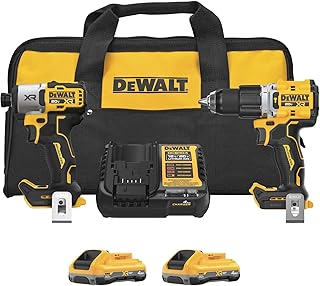
DEWALT 20V MAX XR Impact Driver and Hammer Drill Cordless Power Tool Combo Kit…
4.8★ (110 reviews)
At the one-person stage, your tools are your whole operation — a reliable combo kit means you’re not turning down jobs because your gear let you down.
A Few Things That Will Save You Headaches Early
Whatever you pick, a few habits will make the software worth it:
- Enter every customer into the system, even the small jobs. You’ll want that history later.
- Send the invoice the same day as the job, not later. Every day you wait makes it harder to collect.
- Use the notes field. Write down what you did, what you quoted, what was weird about the job. You’ll thank yourself in six months.
- Connect your software to QuickBooks or whatever accounting tool you’re using before tax season, not during it.
The Bottom Line
You don’t need a complicated system. You need something that helps you look professional, get paid on time, and keep track of your customers. All of the tools mentioned here can do that.
Pick one, set it up this week, and start using it on your next job. The best field service software for your new business is the one you’ll actually open every morning.