Some links on this page are affiliate links. If you sign up through one, TradeStackLab earns a commission at no extra cost to you. We only recommend tools we’d actually use on a job, and a commission never buys a better review.
What Mobile Detailers Actually Need From Software
Mobile detailing is a different animal from a shop-based business. You’re moving between locations all day, often solo or with a small crew. You need to book jobs fast, collect payment on the spot, and keep a clean schedule without double-booking. Most field service software wasn’t built with detailers in mind — but a few tools come close enough to work well.
This comparison covers the platforms that come up most often when detailers ask what software to use. We looked at scheduling, online booking, invoicing, mobile experience, and price. We’ll tell you where each one holds up and where it falls short.
The Short List
For most mobile detailing operations, the realistic options are:
- Jobber — best all-around for small to mid-size operations
- Housecall Pro — strong booking and marketing features
- ZenMaid — built for cleaning businesses, but worth a look
- ServiceTitan — powerful, but aimed at larger companies
There are other tools out there — generic scheduling apps, Square Appointments, even Google Calendar setups. We’re focusing on platforms built for field service because they handle the specific workflow of mobile work better than general tools do.
Jobber
Jobber is the one detailers mention most. It handles the core loop — quote, schedule, invoice, collect payment — without making you learn a complicated system. The mobile app is solid. You can create a job on your phone in about a minute, and clients get automated reminders without you doing anything.
The online booking feature lets customers request appointments through a link you put on your website or social profiles. You approve or adjust before it’s confirmed, so you stay in control of your schedule. That matters for detailing because you’re routing jobs geographically — you don’t want to accept a booking across town between two jobs in the same neighborhood.
Invoicing is straightforward. You can take card payments through the app, send a payment link by text, or let customers pay online. Tips are supported, which detailers appreciate.
Where it’s weak: Jobber doesn’t have built-in route optimization. You can see your jobs on a map, but it won’t automatically sequence them for the most efficient drive order. If you’re running multiple crews or a larger route, that’s a real gap. Reporting is also fairly basic compared to enterprise tools.
Housecall Pro
Housecall Pro is a genuine competitor to Jobber. Its booking and marketing features are arguably stronger out of the box — things like automated review requests, a customer-facing booking portal, and email campaigns are built in rather than bolted on.
For detailing, the online booking flow is clean. Customers can book a service, pick a time, and pay a deposit without you being involved. That’s useful if you’re detailing a car and can’t answer the phone.
The mobile app works well in the field. Dispatching, job notes, before-and-after photos, and payment collection are all there. The chat feature lets you communicate with customers through the platform, which keeps your personal number out of it.
Where it’s weak: Housecall Pro has gotten more expensive over the years, and some features that used to be included on lower tiers have moved to higher plans. Smaller solo operators sometimes find they’re paying for capabilities they don’t need. Customer support quality gets mixed reviews — response times can be slow during busy periods.
Recommended Gear
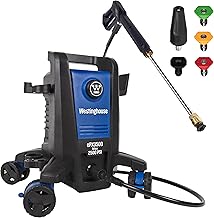
Affiliate Link
Westinghouse ePX3500 Electric Pressure Washer, 2500 Max PSI 1.76 Max GPM with…
4.7★ (12,788 reviews)
If you’re booking jobs geographically and routing between locations all day, a portable electric pressure washer like this one keeps your setup self-contained — no hunting for water hookups at every stop.
ZenMaid
ZenMaid was built specifically for maid and cleaning services, not detailing. But the workflows are similar enough that some detailers use it, especially those who also do residential cleaning or started in that industry.
It handles recurring appointments well, which matters if you have clients on a regular detail schedule — monthly, quarterly, whatever. Automated reminders, simple invoicing, and a clean scheduling calendar are the strengths.
Where it’s weak: It wasn’t designed for mobile vehicle detailing, so some things won’t map cleanly. Service categories, pricing structures, and reporting are oriented toward cleaning. If you need route management, job costing, or anything vehicle-specific, you’ll feel the friction. It’s worth a trial if you’re already in cleaning and expanding to detailing, but probably not the first choice for a detailing-only business.
ServiceTitan
ServiceTitan is the most feature-rich platform on this list by a wide margin. Scheduling, dispatch, customer history, marketing, reporting, technician tracking — it’s all there and built to handle real scale.
For detailing, the honest question is whether you need all of it. ServiceTitan is priced and designed for larger operations — multi-location businesses, companies with dedicated office staff, and trades doing significant revenue. Solo detailers and small crews will likely find it overkill and the cost hard to justify.
If you’re running a detailing company with multiple vans, a dispatcher, and real growth ambitions, it’s worth a serious look. The reporting and customer management capabilities are genuinely better than the smaller tools. But go in with clear eyes — implementation takes time and the learning curve is real.
Where it’s weak: Cost and complexity. It is not a plug-in-and-go solution. Smaller operations often feel like they’re paying enterprise prices for features they’ll never use.
Recommended Gear

Affiliate Link
McCulloch MC1275 Heavy-Duty Steam Cleaner, 45 Minute Runtime, 18 Accessories: Mop…
4.4★ (15,900 reviews)
The article notes detailers appreciate tip support in invoicing — the kind of work that earns tips is exactly what a steam cleaner handles: interiors, upholstery, and the detail work customers actually notice.
Side-by-Side Comparison
| Feature | Jobber | Housecall Pro | ZenMaid | ServiceTitan |
|---|---|---|---|---|
| Online booking portal | Yes | Yes | Yes | Yes |
| Mobile app quality | Strong | Strong | Adequate | Strong |
| Invoicing & payments | Yes | Yes | Basic | Yes |
| Automated reminders | Yes | Yes | Yes | Yes |
| Route optimization | No | No | No | Limited |
| Built-in marketing | Basic | Strong | Basic | Strong |
| Best fit for | Small–mid operations | Small–mid operations | Cleaning crossover | Larger companies |
| Ease of setup | Easy | Easy | Easy | Complex |
Recommended Gear

Affiliate Link
Vacmaster Professional Beast Series 16-Gallon 6.5 Peak HP Wet/Dry Vacuum- VJH1612PF…
4.5★ (4,156 reviews)
Running solo between jobs means you can’t afford equipment that slows you down; a high-capacity wet/dry vac with real suction handles the interior side of a detail without multiple passes or a second trip to the truck.
Which One Should You Pick?
For most mobile detailers — solo operators up to small crews — Jobber or Housecall Pro will cover what you need. Jobber tends to be simpler to get running and has a clean mobile experience. Housecall Pro has an edge if customer communication and marketing automation matter more to you.
If you’re specifically coming from the cleaning world or running both services, give ZenMaid a trial. It won’t have everything a detailer wants, but the recurring-appointment management is genuinely good.
ServiceTitan makes sense if you’ve outgrown the smaller tools — you’ve got multiple trucks, dedicated staff handling dispatch, and you need serious reporting. Don’t buy it because you think you’ll grow into it next year. Buy it when you’ve already grown and the simpler tools are actually breaking down for you.
None of these platforms will handle route optimization well, which is a real gap for mobile detailing. That’s a separate problem — some operators use a dedicated routing app alongside their scheduling software. It’s not ideal, but it’s the current reality.
Before You Commit
Every tool on this list offers a free trial. Use it. Set up a few test jobs, run through the booking flow as if you were a customer, and try invoicing and collecting a payment. The one that feels least annoying in daily use is usually the right choice — fancy features you don’t actually use don’t matter.
Pricing changes. Always check the current pricing as of 2026 directly with the vendor before you sign up. Some platforms have different tiers with feature restrictions that aren’t obvious until you’re already in the system.