Some links on this page are affiliate links. If you sign up through one, TradeStackLab earns a commission at no extra cost to you. We only recommend tools we’d actually use on a job, and a commission never buys a better review.
What to Look for in Maid Service Software
Running a cleaning company isn’t the same as running an HVAC shop or a plumbing outfit. You deal with recurring appointments, rotating teams, customer keys, and clients who expect the same crew every visit. Most field service software wasn’t built with that in mind.
Before you pick a platform, think about what actually matters for your operation:
- Can it handle recurring schedules without a fight?
- Does it let cleaners clock in and out, and can you track who went where?
- Does it send automated reminders so clients don’t forget — or ghost you?
- Can customers book online without you picking up the phone?
- Is the pricing structure fair for a small team?
With those questions in mind, here are the three tools that come up most often for maid and residential cleaning services in 2026. None of them are perfect. We’ll tell you where each one falls short.
The Three Main Contenders
ZenMaid — Built Specifically for Cleaning Companies
ZenMaid is the only one of these three that was designed exclusively for residential cleaning services. That focus shows. Recurring appointments are straightforward to set up. The automated reminder system — texts and emails to clients before their clean — is one of the better ones in this space, and it actually reduces no-shows.
The client-facing booking page works without you being involved, which matters when you’d rather be running your business than answering calls at 8 p.m.
Where ZenMaid is weak: it’s a lean product. If you want deep reporting, complex job costing, or inventory tracking, it won’t satisfy you. It’s also less polished on the mobile side compared to Jobber. And if you plan to expand into other trades someday, you’ll outgrow it fast — it does one thing and doesn’t pretend otherwise.
Ready to see if Jobber fits your business?
Try Jobber →Best for: Solo operators and small cleaning crews who want something purpose-built without a steep learning curve or a steep price.
Jobber — A Solid All-Around Option
Jobber is a general field service platform that a lot of cleaning companies end up using because it handles the basics well and doesn’t cost a fortune at the entry level. Scheduling, invoicing, client notifications, and a client hub where customers can approve quotes and pay — it all works reliably.
The mobile app is genuinely good. Cleaners can check their schedule, get directions, and mark jobs complete from their phone without much training.
The trade-off is that Jobber wasn’t designed for cleaning. Recurring schedules work, but they can feel clunky compared to a tool like ZenMaid. You’ll also notice that some cleaning-specific concepts — like tracking which clients have a key on file or managing team rotations — require workarounds. Jobber gives you the building blocks, but you do some of the assembly yourself.
Pricing steps up as your team grows, so a company that starts on the cheapest plan can find itself paying significantly more once it adds staff and needs more features.
Best for: Growing cleaning companies that also want a platform they could use if they ever added a second trade, or that need a more professional client-facing experience.
Housecall Pro — Feature-Heavy, but You’ll Pay for It
Housecall Pro has more features than either of the other two. Online booking, dispatch, automated marketing, review requests, financing options for customers — it’s a bigger toolbox. If you’re running a larger cleaning operation with multiple crews and real marketing needs, there’s a case for it.
The downside is the cost and the complexity. For a solo cleaner or a small team, a lot of those features just add noise. The platform is generally aimed at companies that have the volume to justify it. If you’re just starting out or you’re running a tight crew, you may end up paying for things you never touch.
Customer support quality has been a mixed bag based on user feedback. That’s worth knowing before you commit.
Best for: Established cleaning companies with bigger teams that need more automation and can absorb a higher monthly cost.
Recommended Gear

Affiliate Link
Kärcher Puzzi 10/1 Commercial Carpet Extractor 12.5 PSI – Spot Cleaner, Stain…
4.4★ (170 reviews)
If your crews handle carpet work alongside recurring cleans, a dedicated extractor like this one is the kind of equipment investment that belongs on your job costing sheet — exactly the detail ZenMaid won’t help you track.
Side-by-Side Comparison
| Feature | ZenMaid | Jobber | Housecall Pro |
|---|---|---|---|
| Built for cleaning? | Yes — exclusively | No — general field service | No — general field service |
| Recurring schedules | Strong | Works, but clunky | Works |
| Online booking | Yes | Yes | Yes |
| Automated client reminders | Strong | Yes | Yes |
| Mobile app quality | Decent | Good | Good |
| Reporting and analytics | Limited | Moderate | More robust |
| Price point | Lower | Mid-range | Higher |
| Good for small teams? | Yes | Yes | Less so |
| Good for larger operations? | Limited | Moderate | Yes |
Pricing changes frequently. Always verify current plans directly with each vendor before making a decision.
Recommended Gear
Affiliate Link
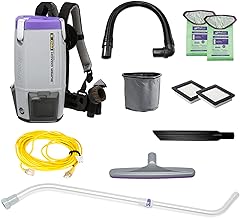
ProTeam Super Coach Pro 6 Backpack Vacuum Commercial with Telescoping Wand Tool Kit…
4.6★ (134 reviews)
The kind of tool a rotating crew can grab and go without a briefing — which matters more when your software is handling the schedule and you need the physical operation to run just as smoothly.
Our Take: Which One Should You Pick?
If you’re a solo cleaner or running a small crew
Start with ZenMaid. The recurring schedule handling and the client reminders alone will save you time every week. It’s not fancy, but it does the job it was built for without overwhelming you or draining your budget.
If you’re growing and want room to scale
Jobber makes sense. It’s not cleaning-specific, but it’s well-built, the app works, and clients respond well to how professional the invoices and booking experience look. You’ll figure out the workarounds quickly enough.
If you’re running a larger operation with multiple crews
Housecall Pro deserves a look, but go in with clear eyes about the cost and make sure you’ll actually use the features you’re paying for. Don’t let a flashy demo convince you to overbuy.
Recommended Gear

Affiliate Link
Rubbermaid Commercial Traditional Janitorial 3-Shelf Cleaning Cart, Wheeled with…
4.7★ (1,151 reviews)
Tracking which clients have a key on file is a workaround in most of these platforms; at least your crew cart situation can be more straightforward than your software setup.
What These Tools Won’t Fix
No software fixes a broken schedule, undertrained staff, or poor communication with clients. These tools are good at reducing admin time and keeping things organized — that’s real value. But if your core operations are a mess, the software will just automate the chaos faster.
Pick the simplest tool that covers your actual needs today. You can always switch later. Switching is annoying, but it’s less annoying than paying for features you don’t use or wrestling with software that doesn’t fit how you work.
Bottom Line
For most small to mid-size maid services in 2026, the choice comes down to ZenMaid versus Jobber. ZenMaid wins on fit. Jobber wins on flexibility and polish. Housecall Pro is worth considering once you’ve got the team size to justify it.
Try the free trials where they’re available. Use the actual software, not just the sales demo. See which one your crew can operate without constant hand-holding. That’s the one you should buy.